This is default featured slide 1 title

Go to Blogger edit html and find these sentences.Now replace these sentences with your own descriptions.

This is default featured slide 2 title

Go to Blogger edit html and find these sentences.Now replace these sentences with your own descriptions.

This is default featured slide 3 title

Go to Blogger edit html and find these sentences.Now replace these sentences with your own descriptions.

This is default featured slide 4 title

Go to Blogger edit html and find these sentences.Now replace these sentences with your own descriptions.

This is default featured slide 5 title

Go to Blogger edit html and find these sentences.Now replace these sentences with your own descriptions.

27 jun 2009

Mas programas para bajar y actualizar tu equipo

Opera 10 beta: Preparada para descarga

Posted: 25 Jun 2009 03:00 AM PDT


Opera 10 beta: Preparada para descarga general

Apenas hace algunas semanas Opera sorprendía a propios y extraños con su nuevo flamante híbrido cliente-servidor web Opera Unite (que les comentábamos en esta entrada) y ahora nos presentan una nueva beta de su navegador de escritorio.

Esta nueva versión trae consigo solución a un montón de problemas y errores, así como mejoras en el ámbito de la estabilidad y mucho más.

Si deseas bajarte la nueva versión (disponible para Windows, Linux y Mac) de Opera 10 puedes pinchar en el enlace que te corresponda.

Descarga: Opera 10 (Windows)

Descarga: Opera 10 (Linux)

Descarga: Opera 10 (Mac)

Vía: TcMagazine

26 jun 2009

Programas que no debes perderte

Estos son unos de los programas que no te debes perder (nuevos) Junio 2009

PRINTFIL

Printfil allows printing to Windows printers, from Dos, Windows programs or Unix, Linux, legacy applications running on a Windows PC via telnet or other terminal emulator software.

Now Linux and DOS print to USB and all the newest all-in-one Windows-only printers with ease.

Download free Printfil trial


You can set your application to print to an ascii file, or you can let Printfil automatically capture one or more parallel port (even from LPT1: to LPT9: simultaneously), and redirect your DOS print jobs to any Windows printer, including USB, GDI, IP network printers, fax printers and PDF writers, even if a printer is physically connected to the captured port or no LPT ports are physically installed, on any machine running Windows 95, 98, ME, NT, 2000, XP, 2003, Vista, 2008, including Terminal Server environments and Linux via Wine.

All this without changes to your applications.
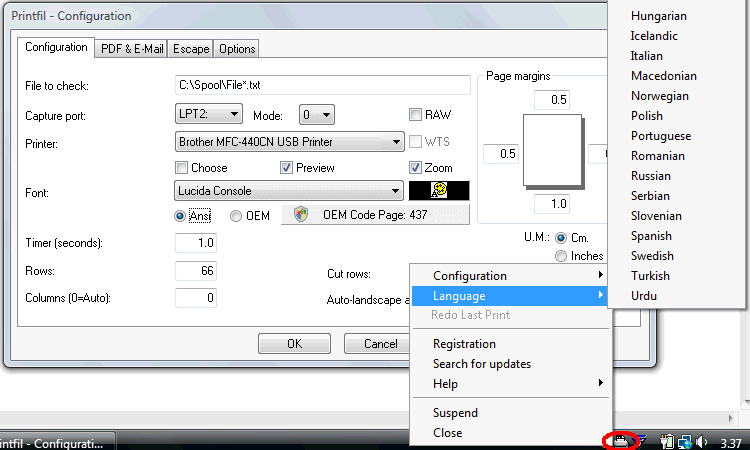
Printfil Configuration dialog and Tray Menu


Want to print from DOS to USB ? You can!, but Printfil is much more than a simple printing redirection utility.

Once your Linux-DOS printing problems on modern printers will be solved...

...you'll find out that Printfil can also make you saving time and money.

For example:

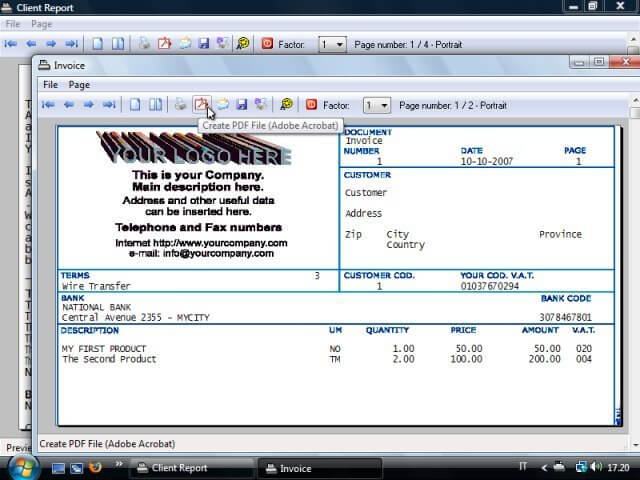
DOS print job with BMP background preview

  • By the integrated print preview you can see on screen what you are about to print, saving paper and ink if it's not correct
  • You can use cheaper GDI printers (Windows-Only) instead of having to buy expensive msdos compatible printers
  • You can merge standard Windows images, like BMP and EMF files to your textual print jobs (logos, invoices, letterhead), so that you can get rid of pre-printed forms
  • You can directly print to a fax printer instead of printing a sheet and scanning it or walking and wait in front of the fax machine
  • With PDF export / e-mailing (including encryption, password protection, with or without user intervention), your legacy print jobs can be sent out easily and with a professional look
  • Archiving print jobs in digital format becomes a very simple task

For a detailed list of Printfil's features, see the description page ...

... or look at the Printfil's test pages.

Printfil got top award by Tucows reviewers
"This program is great and we use it everyday as otherwise our stocklists cant get printed. Thank you also for your follow up service."

Stuart Paul - New Zealand

Problemas para Rapidshare

Ayer Germán nos contaba cómo Rapidshare era condenado a pagar 34 millones de dólares y hoy la plataforma de hosting recibe un nuevo mazazo.

La corte germana ha fallado que el servicio de hosting de archivos no está haciendo lo suficiente para prevenir la distribución de material protegido con derechos de autor y por esto ha ordenado establecer filtros para que esto no ocurra.

La decisión viene secundada por GEMA (viene a ser la SGAE alemana), que se alegra de la decisión tomada por el trinual germano. El sitio de hosting no tiene elección. Deberá intentar filtrar cada subida individualmente y analizar su contenido, aún a sabiendas de que este proceso puede ocasionar gastos masivos insostenibles para el portal…

Vía: TcMagazine

Hibernar e iniciar a una hora determinada Utilizando el programador de tareas

En este tutorial, Pedro Martínez explica como utilizar correctamente el Programador de Tareas de Windows.
  1. Abrir la Consola de administración de Microsoft (MMC) que es el programa de Windows del que forma parte el Programador de tareas. Inicio > Ejecutar > mmc.exe


  1. Agregar en la Consola de administración de Microsoft (MMC), manualmente, desde el menú Archivo, los siguientes complementos:
    • Servicios (locales), que es donde se encuentra el Programador de tareas.
    • Servicios de componentes, donde se registran aplicaciones, configuraciones, transacciones y procesos en ejecución.
    • Usuarios locales y grupos, donde se hallan las diferentes cuentas y grupos de trabajo


  1. Ahora, desde el menú Archivo le digo Guardar como, dejándole el nombre predeterminado, y Acepto. Se guardará en “C:\Documents and Settings\Ginés\Menú Inicio\Programas\Herramientas administrativas”.

  2. Compruebo que en la Consola de administración de Microsoft (MMC), en los Servicios (locales), el Programador de tareas quede con los campos de la siguiente forma:

    Servicios locales Descripción Estado Tipo de Inicio Iniciar sesión como
    Programador de tareas Iniciado Automático Sistema local


  1. Si esto no fuera así, le abro el menú contextual y en la ficha General le pongo el Tipo de inicio indicado, y en la ficha Iniciar sesión elijo la opción Cuenta del sistema local y, como puede hacerme falta para otras cosas, también selecciono la casilla Permitir a los servicios que interactúen con el escritorio.


  1. Bien, ya tengo preparada mi cuenta (soy uno de los administradores del equipo) para que me obedezca el Programador de tareas.Ahora voy a crear tres ficheros BAT con un Documento de texto -Bloc de notas- para que me copie unos archivos de una unidad a otra, otro para que, después, se apague el PC (que hiberne) y un último fichero para que se reinicie a una hora determinada.

Antes que nada, unas notas previas:

  • Indicar que se llaman procesos batch. La razón por la que a menudo se alude a ellos como bat es porque el entorno msdos requiere como máximo tres letras en la extensión y por tanto los archivos tienen la extensión .bat; además, no se puede rebasar en su nombre los 8 caracteres ni se pueden emplear símbolos no permitidos en msdos).

  • Dado que en msdos no se admiten nombres largos (más de 8 letras) ni espacios, cuando quiero utilizar un nombre de Windows en msdos debo saber que éste será reconvertido a su nombre corto. Este se obtiene añadiendo los seis primeros caracteres válidos del nombre, luego el signo ~ (Alt 126) y luego un número. De esta forma, un archivo del tipo léeme, que se encuentre en Mis documentos en Windows XP, tendrá el path: c:\misdoc~1\leeme.txt

  • También se pueden utilizar (mientras las comillas para delimitar el nombre "c:\Mis Documentos\leeme.txt". Pero esto sólo vale cuando se utiliza msdos como consola (no cuando se inicia Windows XP en modo msdos). No obstante, esta opción es la más cómoda para marcar las rutas en nuestro trabajo, puesto que vamos a programar tareas que se ejecuten en Windows.

Así quedaría el primer fichero:

CopyArch.bat

Recuerda que para ver la extensión debes tener desactivada en Opciones de carpeta > Ver, la casilla “Ocultar las extensiones de archivo para extensiones de archivo conocidas”.

del d:\ole\clients.met

xcopy "c:\archivos de programa\eMule\config\clients.met" d:\ole

del d:\ole\cancelled.met

xcopy "c:\archivos de programa\eMule\config\cancelled.met" d:\ole

exit

NOTA: Las comillas sirven para evitar que deje de ejecutarse por los espacios o por los nombres excesivamente largos.

Así quedaría el segundo fichero:

Of_PC.bat

rundll32.exe PowrProf.dll, SetSuspendState Hibernate

exit

NOTAS:

  • Cuando el PC pasa a un estado de hibernación se guarda una imagen del escritorio con todos los archivos y documentos abiertos y, después, se apaga el equipo. Al encenderlo, los archivos y documentos se abren en el escritorio en el mismo estado en que se encontraban anteriormente.

  • El consumo energético es prácticamente idéntico al del estado de Apagado.

Y así quedaría el tercer fichero:

ReiniPC.bat

shutdown -r -f

  1. Por fin voy a Programar las tareas:

    Bien desde: Inicio > Todos los programas > Accesorios > Herramientas de sistema > Tareas programadas > Agregar tarea programada,

    o desde: El Panel de control > Tareas programadas > Agregar tarea programada.

Obtendremos la siguiente secuencia de ventanas:


Ahora viene una ventana muy importante; en primer lugar, si no tenemos una contraseña configurada en nuestro usuario, la tarea puede que no se ejecute. Resulta que como soy el único usuario de mi PC no tengo contraseña para mi cuenta (es muy incómodo y muy poco práctico). Entonces debo evitar que me salga una ventana con el siguiente mensaje de error:

Las tareas programadas en Windows XP requieren de una contraseña de inicio de sesión, o sea que, para que podamos ejecutar una tarea programada es necesario crear o tener una contraseña en el usuario de Windows. Para establecer una contraseña de inicio de sesión debemos ir a ''Cuentas de usuario'' en el Panel de control.


Yo he conseguido vencer esta dificultad utilizando el siguiente nombre de usuario: NT AUTHORITY\SYSTEM. Con dicho nombre no necesito clave, puesto que cuando instalé el S.O. no puse ninguna.


Es importante, ahora, marcar la casilla Abrir propiedades avanzadas, ya que debo configurar las tareas de la forma que muestra la imagen inferior para evitar que dejen de ejecutarse las tareas ante cualquier contratiempo. (También puedo hacerlo a posteriori haciendo click con el botón derecho a abriendo propiedades en el menú contextual correspondiente.

IMPORTANTE: Si quiero abrir Windows sin necesidad de hacer clic sobre el logo ni de meter contraseña:

Puede ser que a raíz de alguna de las actualizaciones de Windows odebebido a la creación de cuentas tengamos que hacer clic sobre un logo para iniciar nuestro XP. Si no queremos logearnos (hacer clic sobre el logo) o no queremos que nos pida contraseña cada vez que Windows XP se inicia, podemos descargarnos la siguiente herramienta de Microsoft Tweak UI Tweak UI nos logea automáticamente al arrancar el sistema, es decir, se salta el clic sobre el logo y la clave.

Tras instalarla vamos a Inicio/Todos los programas/Powertoys for Windows XP/TweakUI y en el panel izquierdo pulsamos "Logon'' y luego ''Autologon''. Sobre el panel derecho marcamos la casilla ''Log on automatically at system startup'' y presionamos ''OK''. Así Windows no nos pedirá la contraseña de usuario al iniciarse.

Según lo estima Bill Gates

Según William Gates III, el que no tenga un negocio basado en internet en un par de años estará fuera del mercado. A continuación un ejemplo:

"ARE YOU READY TO DISCOVER HOW ANYONE CAN EASILY MAKE OVER $4000/WEEK ONLINE WITHOUT SELLING, ADVERTISING, REFERRING OR OWNING A WEBSITE?"


Dear Fellow Entrepreneur,

Hi and welcome to my site. OK, I'm going to keep this short and sweet - I'm not going to bore you with the usual "rags-to-riches" story because I'm pretty sure you don't want to hear it.

What I will say though, is this...

If you're tired of all the so-called "systems" and business opportunities that require you to sell affiliate products, run pay per click advertising campaigns, operate websites or recruit new members then I have excellent news for you.

Keep reading because I guarantee that this will be the most important piece of information you will ever read about making money online... or in general for that matter.

I have discovered an amazingly simple income system that will allow you and anyone else to earn an incredible income from home, just by using your computer and the Internet.

This system is called "The Cash1234 System" and it does NOT involve any of the following:


* No building websites

* No selling products - in any way shape or form

* No advertising

* No data entry

* No Adsense

* No mailing lists

* No rebate processing

* No recruiting new members - this is not MLM

* No uplines or downlines

* No currency trading

* No chain letters

* No surveys or "paid to read" programs


Recent Comment

"I subscribed to your cash system yesterday. Wow! So simple and yet brilliant. Congratulations and many thanks!"

Bruce (USA)

I have been using this simple, 4 step system for the past couple of years to generate a mind-blowing income... and now I'm going to show you EXACTLY how.

Now I have absolutely no doubt that you've heard claims like that a thousand times before and you may have even tried a few programs already?

If you have tried then I can guarantee that you would have been required to do at least one of the following in order for you to make a profit:

1) Run a "pay per click" advertising campaign

2) Join affiliate programs

3) Recruit new members

4) Build websites

Sure, all of the above may be effective ways of making money, but are they for everyone?

Of course not!

Here's why:

1) "Pay per click" advertising costs have shot through the roof. Getting a decent ranking means paying more per click - most people end up losing money instead of making it.

2) Affiliate links and programs can be very confusing and overwhelming if you've never used them before.

3) Recruiting new members can be a waste of both time and money.

4) Building websites is time consuming, costly and too complicated for most people.


Forget about all of the above. In fact, forget EVERYTHING you think you know about making money online because I'm going to show you exactly how to make thousands of dollars by using methods that are so simple, so incredibly obvious, it still amazes me that they actually do exist.

For the past few months I have not had to sell one product, join one affiliate program or build a single website and I easily make $4000 per week without fail.


HERE'S A LITTLE PROOF...


Just take a look at the earnings samples below. I will show you EXACTLY how this money is made - every single step of the way.

Now keep in mind that the figures you see below are 100% profit due to the simple fact that there are zero expenses involved!


For most days I only have to work for around 1-2 hours. Not only is the work incredibly simple, but it's even entertaining!

I simply wake up whenever I feel, check my online accounts - where there is ALWAYS money waiting to be collected, perform the necessary tasks, switch off my computer and enjoy the rest of my day. No commute to work and no worries. I just relax and make piles of money, day after day and week after week. I now dread all those days I spent slaving at my old job for minimum wage!


Recent Comment

"Over $450 made on the very first day. I simply could not be any happier!"

Lucy (USA)


THE PAY IS VIRTUALLY INSTANT

That's right, as soon as money goes into my online accounts, I am free to spend it! I simply use a special debit card which allows me to withdraw my earnings at anytime of the day from any ATM anywhere in the world - no waiting for commission checks at the end of each month.

And since I don't have to rely on making sales I can just sit back, run the system and make a steady, GUARANTEED PROFIT each and everyday.


SOME MORE FACTS:

* Anyone in any country can make money with this

* This does not involve promoting affiliate products

* You will never have to run a pay per click advertising campaign

* You will not be applying for government grants

* This has nothing to do with MySpace, YouTube or anything else similar

* You will never need to work long hours

* This is not cash gifting

* This has nothing to do with investing in Real Estate

* This is not some "chain letter" scheme

* This is not "rebate processing"

* This is not a mail from home system

* You will never have to recruit anyone

* This is not a currency trading system

* You will never need to build or maintain websites

* This does not involve paid surveys or emails

* This is not envelope stuffing


Recent Comment

"I've paid more than 10 times as much for other programs that never worked. The Cash1234 system was a very nice change. I've already made more from this than all the other programs combined!"

Bill (UK)

THIS WILL NEVER BECOME SATURATED - EVER

This system is not based around selling or advertising - therefore competition means nothing. It doesn't matter if one or one million people do this - everyone can still earn as much as they want, whenever they want.

Market saturation is no issue. Some income systems are simply brilliant when they come out, but once everyone starts catching on, the competition increases and your earnings decrease.

This will never happen with Cash1234 - guaranteed. Everyone in your street or suburb could run this at the same time and you could all make just as much money - competition means nothing!

Cash1234 is an incredibly simple system - so simple, I bet that even a 12 year old could run this and make money. There is absolutely nothing complicated about it - 4 steps, that's all.

This is not a 500 page ebook and this is not some complicated money making course. This is a short, straight-to-the-point money making system that works without fail each and every time.


FREQUENTLY ASKED QUESTIONS

The world is currently in a financial crisis. Is it still possible to make large amounts of money online?

Yes, absolutely. When it comes to making money with this, the economy has ZERO effect on your earning potential. Good or bad, you are still going to be just as successful. In fact, now is a better time than ever to start making money online.

Cash1234 looks very similar to other ATM card money making systems that I have previously seen. Is your program just a cheaper version?

No - definitely not. The Cash1234 System has absolutely nothing to do with any other ATM card system. This is not affiliated or related to any other system in any way shape or form. The Cash1234 is completely unique - there is nothing else like it.

Does this really involve no selling, advertising, recruiting or websites?

There is absolutely NONE of the above involved.

Does this involve filling out online surveys or getting paid to read email?

No, there is no way that you could make $4000/week by filling out surveys or reading email.

Clickbank or PayPal is not available in my country, can I still make money?

Yes - There is no selling involved, therefore you don't need to create a Clickbank or PayPal account.

Do I need to download anything to my computer?

No, the system is presented in a private, members only website. You will be able to access this website 24 hours a day, 7 days a week.

Does this involve adult related material or anything else unethical?

No, absolutely not.

Is this one of those programs where the only way to make money is by referring it to other people?

No, there is absolutely no selling, advertising or referring involved - of any kind.

Is there any support provided for Cash1234 members?

Yes, of course. Fast and reliable support is provided for all members.

Can this be used worldwide?

Yes, this can be used from any computer, anywhere in the world.


Recent Comment

"I just made $500 from step 1, thank you, the purchase was worth it."

Mzoxolo (South Africa)

Recent Comment

"Hi,

Bought your 1234 system and I want to thank you for sharing so much useful money making information. FANTASTIC! It really does work. I made several hundred in no time."

Greg (USA)

SO WHY AM I SHARING THIS WITH YOU?

Well firstly, as I mentioned above - competition is no issue. It doesn't matter how many people do this along with me because it will have absolutely no effect on my personal earnings.

Also, instead of saying something like "I just want to help people" or "I want to put an end to Internet scams" I'll simply be honest and say this....

Anything useful is worth selling for a price - plain and simple. People want to know how to make money and I'll gladly show them - for a price.

I show you how to make $4000 every week by doing virtually nothing and you give me a small fee for that knowledge - that's a pretty fair transaction don't you think?


OK, HOW MUCH IS THIS GOING TO COST?

$100?, $50?... try $12

Yes, a measly $12 is all it takes. There are no hidden or monthly costs. You pay the small fee just once and you receive instant access to the system that earns me $4000/week, it's that simple.

I could easily be like everyone else and charge 50 bucks for it but what's the point? I make the REAL money by actually using this system - not selling it.

You will not find a system like this anywhere else online. This is not one of those programs that hundreds of people are selling on ebay... this is 100% original content!


THIS WILL MAKE YOU MONEY

Cash1234 is a foolproof system that will make you money - no matter your previous level of experience. You can order now and access the system immediately after payment has been made. You will even be able to start making money within 10 minutes of starting! You can order anytime you feel - 24 hours a day, 7 days a week from any country worldwide.

See you in the members area...


CLICK HERE TO ORDER NOW


Payment is one-time only. There are no monthly or ongoing fees.

You gain instant access to the members website straight
after payment has been made. No downloading is required.


Click here for other payment options


25 jun 2009

La famosa red Myspace, ha despedido entre 300 y 450 personas de sus oficinas fuera de EE.UU

Myspace: Despide a más de 300 personas debido a su caída de popularidad portales comunidades

La famosa red Myspace, ha despedido entre 300 y 450 personas de sus oficinas fuera de EE.UU para hacer frente a la estrepitosa caída de ingresos que viene sufriendo desde hace algunos meses.

Esto significa que cerrarán 15 de sus 34 oficinas repartidas en 28 países, cifra para nada desdeñable.

La competencia de otras redes en auge como Facebook o Twitter son las que están quitando muchos usuarios a Myspace, que en relativamente poco tiempo ha visto drásticamente reducido su nivel de tráfico. Lo mismo ha ocurrido con sus ingresos, que han sufrido una recesión desde los 605 millones de dólares del 2008 a los 520 del presente ejercicio.

Myspace se encuentra en un punto crítico en el que otras redes sociales vienen pisando fuerte. Es ahora cuando debe remodelarse, adaptarse al nuevo escenario de mercado y evolucionar con él.

Nuevos Avances en visión computarizada

Los libros de ciencia ficción y las películas siempre imaginaron que las computadoras algún día serían capaces de ver e interpretar el mundo. En Google, creemos que la visión computarizada tiene beneficios potenciales tremendos para los consumidores, por lo cuál le dedicamos muchos esfuerzos de investigación.
Hoy, un equipo de Google está presentando una investigación sobre reconocimiento de monumentos (Estatua de la Libertad, Torre Eiffel) en la conferencia Computer Vision and Pattern Recognition (CVPR) en Miami, Florida. En el trabajo, presentamos una nueva tecnología que permite que las computadoras identifiquen rápidamente imágenes de más de 50,000 monumentos de todo el mundo con una exactitud aproximada del 80 por ciento.

Para ser claros de entrada, este es un trabajo de investigación, no un nuevo producto de Google, pero igual creemos que es muy bueno. Para nuestra demostración, comenzamos con una foto de un monumento sin identificación, ingresamos su dirección Web en el motor de reconocimiento y en un instante la computadora lo identifica y lo nombra:
"Monumento reconocido: Acrópolis, Atenas, Grecia." Gracias computadora.

Como lo logramos? No fue fácil. Para comenzar, dónde encontramos una larga lista de miles de monumentos? Y aún teniendo esa lista, de dónde obtienes las fotografías para desarrollar representaciones visuales de las locaciones? Y cómo obtienes esos materiales en un modelo coherente que funcione, sea veloz, y pueda procesar una enorme cantidad de material? Imagina la cantidad de fotos diferentes del puente Golden Gate que has visto - las diferentes perspectivas, condiciones de iluminación y calidad de imagen. Reconocer un monumento puede ser difícil para un humano, asi que ni que hablar para una computadora.

Nuestras investigaciones se estructuran sobre las vastas cantidades de imagenes existentes en la Web, la capacidad de realizar búsquedas para esas imagenes, y los avances en reconocimiento de objetos y técnicas de agrupamiento. Primero, hemos generado una lista de monumentos apoyándonos en dos fuentes: 40 millones de fotografías con GPS (de Picasa y Panoramio) y páginas Web sobre tours online. Luego, encontramos imagenes para cada monumento utilizando estas fuentes y Google Image Search, que luego limpiamos utilizando técnicas de agrupamiento. Finalmente, desarrollamos un sistema altamente eficiente de indexación para el rápido reconocimiento de imagenes.

Si bien hemos avanzado mucho para desenterrar la información almacenada en los textos en la Web, todavía hay mucho trabajo por delante para encontrar la información almacenada en los pixels. Esta investigación demuestra la posibilidad de la visión computarizada eficiente basada en grandes cantidades de data. Esperamos que estas enseñanzas sean una buena fundación para futuras investigaciones en visión computarizada.

Si estás interesado en contar con más información sobre esta investigación, accede al siguiente paper.

Análisis e imágenes de Windows 7 Beta 7055

Todo parece indicar que Windows 7 llegaría a mediados de 2009 y ésta vez los ingenieros de Microsoft aseguran haberse esforzado por pulir todas las carencias de su predecesor. Una de ellas, la más criticada por los usuarios: su velocidad y según lo han anunciado recientemente responsables de Microsoft en dos encuentros para programadores (el PDC (Professional Developers Conference) y TechEd (Technical Education).

En fin, sin más preámbulos les presento un poco de lo que podría llegar en el nuevo año que se avecina. Para comenzar, el proceso de instalación.

Es bastante rápido dentro de todo, demora alrededor de 20 minutos dependiendo del hardware. Como novedad pueden ver el nuevo screen boot, que ahora incluye una amigable animación con el conocido logo de las ventanas.


Al finalizar tenemos el escritorio, sobrio y limpio, la súper taskbar activada por default, así como el cambio de fondo del escritorio. Esto se produce si se instalan los controladores de video adecuados para activar activar Aero. Esta nueva beta incluye nuevos temas, los cuales traen activado por default el cambio de fondo. Para activar Aero solo hay que presionar conjuntamente las teclas Win + TAB.